
Use the Store API to connect a server application to one Reviewbird store. You can read reviews. You can also send product, order, and review data to Reviewbird.
Access and plan requirements
- The Store API is available on the Free plan and higher plans.
- The organization owner, an Administrator, or a Manager can open the Developers page and manage keys.
- A Moderator or Viewer cannot open this page.
- Each key gives access to the Store API routes for one store. A key does not have separate permission scopes.
Create an API key
- Select the applicable store.
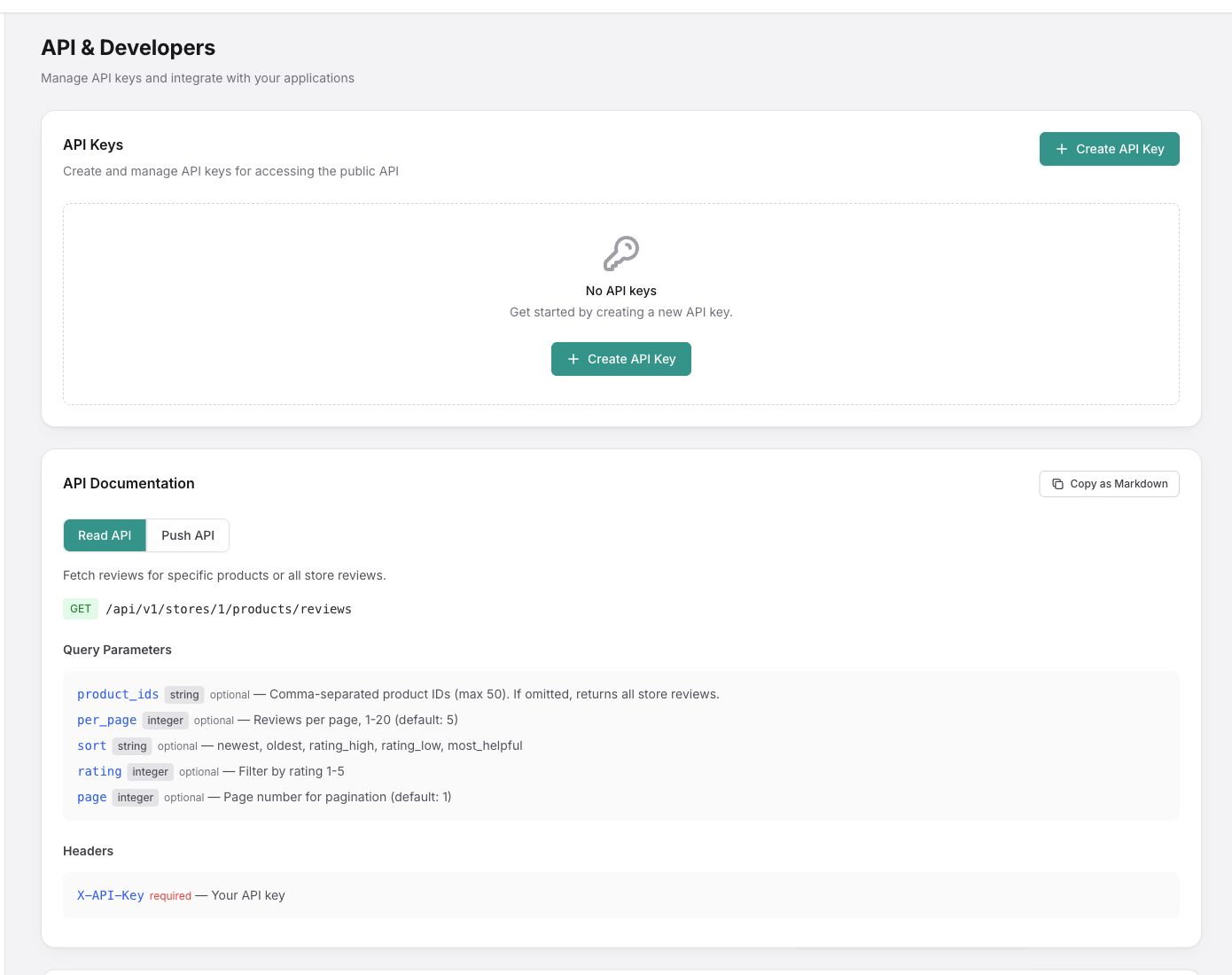
- Open Developers.
- In API Keys, select Create API Key.
- Enter a name for the key. The name is required and can contain a maximum of 255 characters.
- Select Create.
- Copy the complete key.
- Store the key in a secure location.
Important: Reviewbird shows the complete key only once. After you close the message, the page shows only the key prefix. If you lose the key, create a new key. Then revoke the old key.
Authenticate a request
Send the key in the X-API-Key request header. Use the store ID that Reviewbird shows in the API endpoint. The key must belong to that store.
X-API-Key: YOUR_API_KEY- Do not put the key in browser code, a public repository, or a theme file.
- Do not send the key to a person who does not need API access.
- Reviewbird limits each key to 120 requests in one minute.
- The response headers contain the rate-limit data.
- A request with a key for a different store returns an authorization error.
Available endpoints
| Method and path | Function | Important rule |
|---|---|---|
GET /api/v1/stores/{storeId}/products/reviews | Get reviews for selected products or for the store. | You can send a maximum of 50 comma-separated product IDs. Set the page size to a value from 1 to 20. The default page size is 5. |
POST /api/v1/stores/{storeId}/products | Create a product or update a product that has the same external ID. | Create products before you send orders or reviews for them. |
DELETE /api/v1/stores/{storeId}/products/{externalId} | Mark a product as no longer in the store. | This also removes the classifications that the API supplied for the product. |
POST /api/v1/stores/{storeId}/orders/event | Send an order event. | The order must contain at least one line item. Each product must already exist. |
POST /api/v1/stores/{storeId}/reviews | Send a review for a product. | The rating must be from 1 through 5. If you do not send a status, Reviewbird uses the default moderation status of the store. |
DELETE /api/v1/stores/{storeId}/reviews | Delete a review by its external ID. | The deletion is permanent. You cannot recover the review. |
On the Developers page, select Read API or Push API to see all fields, responses, and code examples. Select Copy as Markdown to copy the current API reference.
Revoke an API key
- Open Developers.
- Find the key by its name and prefix.
- Select Revoke.
- Confirm the action.
Warning: Reviewbird revokes the key immediately. All applications that use the key lose access. Update the applications with a new key before you revoke a key that is in use.