
Order Follow-up Email Template: A new way to request reviews
Reviewbird’s Order Follow-up template checks in about a real order, invites a reply, and asks for an honest product review without a separate sales pitch.

Sending emails is easy. Getting customers to see the emails you send is increasingly hard. Everyone is fighting for their share of the attention economy and email clients like Gmail are working overtime to curate inboxes. And the decision about which emails end up in the "promotions" tab or in the inbox is pretty much arbitrary.
We can't control the algorithm, but we can change our approach.
Our new Order Follow-up email template starts with the order and the customer instead. Instead of just asking for a review, we reach out to the customer asking (genuinely!) how their order went. This is a great place to catch those future one-star reviews and find out about issues early. But it also does a second thing: it includes a soft ask for a review
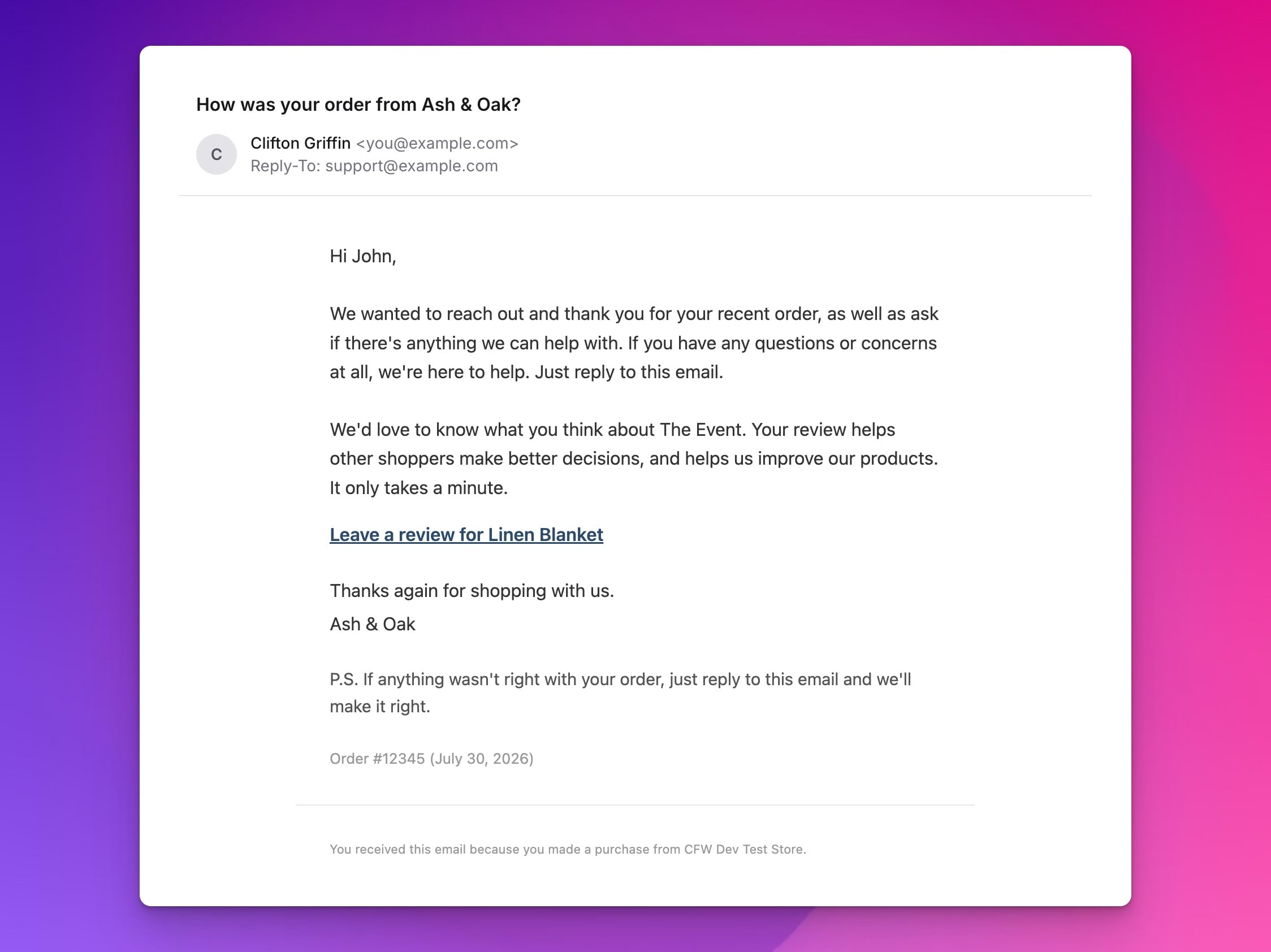
It's one email with two clear jobs: follow up on a real order and request a review. The order is not a pretext. The customer service message comes first and the link to review second.
One email, two clear jobs
- Order follow-up: Thank the customer, ask whether everything is right, and give them a real address to reply to.
- Review request: Ask what they think about one product from the order and give them a direct link to the review form.
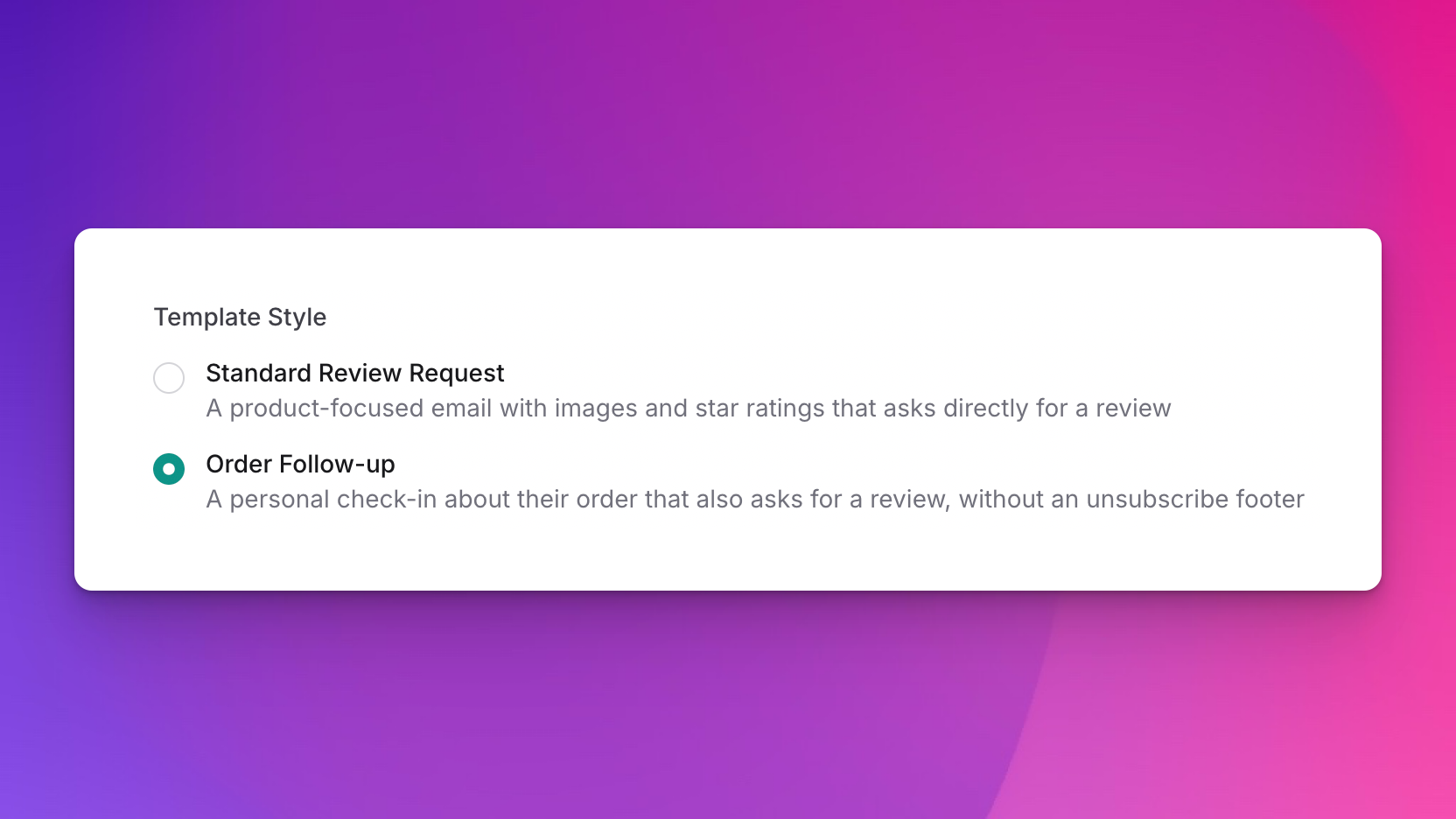
Order Follow-up is a template style for the existing Review Request email. It replaces the standard product-focused design. It does not add another scheduled message. Your current request timing, country rules, product selection rules, blocklist, and reminder settings still apply.
A simple format, not a Promotions trick
Google describes the Gmail Promotions category as the place for deals, offers, and other promotional email. It describes Updates as the place for automated confirmations, notifications, statements, and reminders. An order follow-up with no discount, cross-sell, or separate sales pitch is closer in purpose to an update. That is an inference from Google’s current category descriptions, not a promise about where Gmail will put a message.
The new template removes common campaign-style elements. It uses a simple letter layout, a plain review link, one order reference, a personal From name, and an optional Reply-To address. A verified Reviewbird Custom Sender is required. Custom Sender is currently available on Plus and higher plans.
The goal is relevance, not a filter workaround. No email template can guarantee the Primary tab or keep every message out of spam.
Delivery still depends on authentication, sender reputation, complaint rates, message content, and each recipient’s mailbox settings. Google’s sender guidelines say that authenticated messages are less likely to be rejected or marked as spam. Google also advises senders not to mix promotions into sales receipts. Yahoo’s sender guidance also recommends timely, relevant email and separate streams for marketing and user messages.
What the customer sees
- A clear subject about their order from your store.
- A thank-you and an invitation to reply if they need help.
- A request for an honest review of one eligible product.
- A direct text link that opens the review form on the product page.
- An order number and order date for context.
- A store sign-off and an optional P.S. that invites another reply.
If something went wrong, the customer can reply. They can also leave an honest review. One action never hides or blocks the other.
Set up Order Follow-up in six steps
- Use a plan with Custom Sender, which is currently Plus or higher. Then configure and verify your Custom Sender.
- In your Reviewbird store dashboard, go to Emails → Email Templates.
- Open Review Request and enable the email if it is off.
- Under Template Style, select Order Follow-up.
- Edit the From name, Reply-To address, subject, message, review-link text, order reference, sign-off, and P.S. line. If Reviewbird verified your sender domain with DKIM, you can also use another From address on that domain.
- Check the live preview, send a test email, and save the template.
If Reviewbird cannot verify the Custom Sender, it sends the standard Review Request template instead. A normal Reminder can still follow later if you enabled reminders.
Keep the service message first
- Wait until the customer has had enough time to receive and use the product.
- Use an accurate order-based subject. Do not add a false “Re:” or “Fwd:”.
- Put the order check-in and support invitation before the review request.
- Use a Reply-To inbox that your team monitors.
- Leave coupons, product recommendations, and cross-sells in your marketing emails.
- Keep your blocklist and unsubscribe records current, and monitor delivery results.
An order reference is not a legal shortcut. The FTC’s CAN-SPAM guidance says that the primary purpose of a mixed message can depend on the subject and on where the order-related content appears. Review the rules that apply to your store and customers.
Ask for honest feedback, not positive feedback
Order Follow-up is not review gate keeping. The support invitation and the review link appear in the same message. Send the request under the same rules for every eligible customer. Do not hide the review link when a customer reports a problem, and do not ask only customers who seem happy.
If you use a separate review incentive, do not make the reward depend on a positive rating. Disclose the incentive where required. The FTC’s review guidance for marketers says not to ask only customers who are likely to leave positive reviews and not to condition an incentive on positive sentiment.
Common questions
Will Order Follow-up keep email out of spam or Promotions?
Hopefully! It keeps the message tied to a real order and removes common sales-campaign cues. Mailbox providers still use authentication, reputation, complaint rates, message content, and recipient behavior to make delivery and category decisions.
Does it add another email to the schedule?
No. It changes the style of the existing Review Request email. Your normal request timing and recipient rules still control when it sends.
Does it replace review reminders?
No. If reminders are on, Reviewbird can still send a Reminder after the Order Follow-up.
Start with the order
Use Order Follow-up when you want to check on the customer first and ask for an honest product review second. Keep the message useful, keep the reply path real, and keep sales content in a separate campaign.