

How to Get More WooCommerce Product Reviews Without Annoying Customers
Get more WooCommerce product reviews with better timing, a clear request, a simple form, and one polite reminder, without bothering customers.

Product reviews give shoppers something your product copy cannot: a view from someone who has already bought the item. They can answer questions about fit, setup, quality, and daily use. They can also show you what customers value most.
Still, asking for a review can feel awkward. You want more WooCommerce product reviews, but you do not want good customers to feel chased after every order.
The good news is that you do not need more messages. You need a better request. Ask after the customer has used the product, keep the task easy, and stop as soon as they respond.
Why a better review process matters
WooCommerce calls product reviews a useful tool for conversions and customer relationships. That makes sense. A clear review can answer the question that stops a shopper from buying, such as “Does this run small?” or “How hard is this to set up?”
Reviews also give you useful product feedback. The goal is not to collect the largest number of comments. The goal is to collect honest reviews that help the next shopper make a good choice.
1. Ask after the customer has used the product
A request sent at the wrong time feels like noise. If it arrives before delivery, the customer cannot give a useful answer. If it arrives weeks after a simple purchase, the customer may no longer care.
Start the clock from fulfillment or delivery, not from the order date. For many stores, the WooCommerce Completed status is a practical starting point. Then give the customer enough time to use the item.
Use these ranges as test values:
| Product type | Suggested wait |
|---|---|
| Digital download | 1–3 days after access |
| Food, flowers, or immediate-use products | 3–7 days after delivery |
| Clothing, accessories, or simple equipment | 7–14 days after delivery |
| Home goods or durable products | 14–30 days after delivery |
| Skin care, supplements, or repeat-use products | 21–45 days after delivery |
A seasonal gift may need a request after the likely use date. A backordered item may need a longer delay. If your catalog has several product types, use different rules where you can.
2. Write one clear and honest request
A review request has one job. Do not make it compete with a sale, newsletter, referral offer, and product launch.
Use a sender name the customer knows. Show the product name and image. Give one reason to respond, and use one clear button.
A simple review request
Subject: How is [product name] working for you?
Hi [first name],
You have had some time with [product name]. Would you take a minute to leave an honest review?
Your experience can help another shopper make a better choice.
Button: Review [product name]
Ask for an honest review, not a positive one. Avoid phrases such as “Tell us how much you love it” or “Leave a five-star review.” The FTC review guidance says businesses should not ask only people who are likely to leave positive reviews. It also says businesses should not discourage negative reviews.
3. Make the review easy to complete
Do not make the customer search for the product or sign in again if you can verify the order another way. The request should open the correct review form, work on a phone, and keep the verified purchase link.
Large orders need care too. Asking for eight reviews after one order can turn a favor into a chore. Choose one to three products, or let the customer select which item they want to review.
Test the full path on a phone before you turn the request on. A clear email cannot fix a slow page, a broken link, or a long form.
4. Send one polite reminder
Customers miss emails. One reminder gives them another chance without creating much pressure.
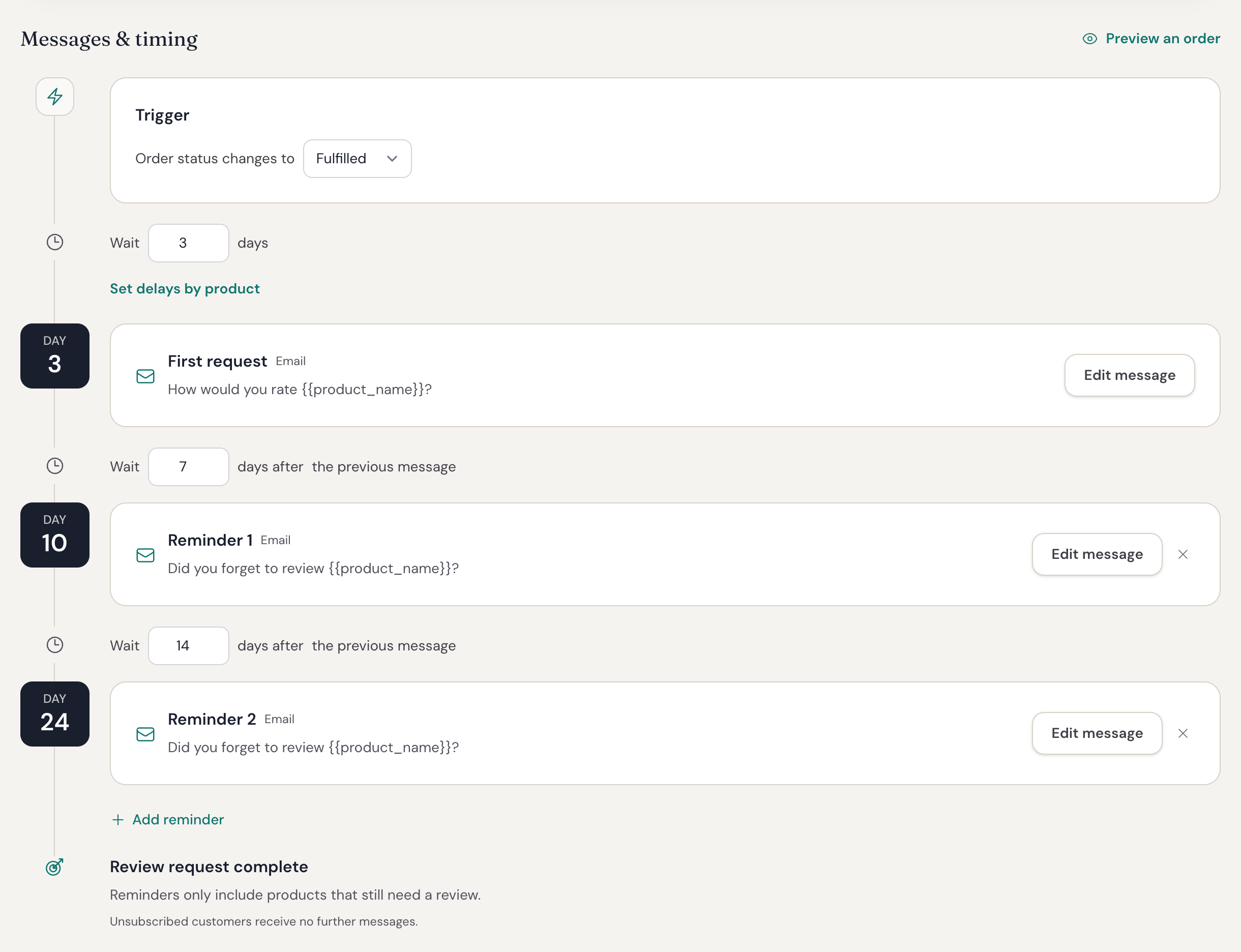
Wait several days after the first request. Make the reminder shorter, and send it only if the customer has not reviewed the selected product.
Subject: Still have a minute to review [product name]?
Hi [first name],
If you have used [product name], we would still value your honest review.
Button: Leave a review
Stop the sequence as soon as the customer responds. A reminder sent after a completed review tells the customer that your store is not paying attention.
5. Ask for useful detail, but keep it optional
“Great product” is kind, but it may not help the next shopper. One or two product-specific prompts can lead to a more useful review:
- How did it fit?
- What did you use it for?
- How easy was setup?
- What should another buyer know?
Do not turn the form into a survey. Photos and videos should also be optional. Ask for them after the rating and written review, and make sure upload works well on a phone.
6. Use incentives and support fairly
A coupon can increase participation, but it must not buy a positive opinion. The FTC Consumer Reviews and Testimonials Rule Q&A says an incentive must not depend on a positive or negative review. You should also disclose the incentive and check the rules for each platform where the review will appear.
If a customer reports a problem, make support easy to reach. Help with the order, refund, replacement, or product use, but keep the review path open. Do not send only happy customers to the public form.
This section gives general information, not legal advice. Check the rules that apply to your business and location.
7. Watch for customer pressure
Review totals tell only part of the story. Also watch completion rates, opt-outs, spam complaints, and support replies. These signals show whether the process feels easy or intrusive.
Change one main item at a time. Test the delay first, then the subject line or form. If you change everything at once, you will not know what helped.
How Reviewbird makes this easier
Reviewbird automatic review requests connect each message to a real WooCommerce order. You can choose the fulfillment status, set the delay, limit the products in each email, and stop reminders after a response.
Reviewbird also gives the customer a guided review form with optional photo and video uploads. Hosted email delivery and stop rules remove work that is easy to miss when you manage requests by hand.
Start with one product group. Test the email and form on your phone. Then turn on the workflow for the rest of your catalog.
Start your Reviewbird trial when you are ready to turn completed orders into a steady source of useful product reviews.
Frequently asked questions
How do I get customers to leave reviews on WooCommerce?
Send a short request after the customer receives and uses the product. Link to the correct review form, keep the form easy, and send one reminder only if the customer has not replied.
How long should I wait before I ask for a product review?
The wait depends on the product. An immediate-use product may need only a few days. A durable or repeat-use product may need several weeks. Start with a delay by product type, then adjust it with your completion data.
How many review reminders should I send?
Start with one reminder. Stop the sequence when the customer submits a review. Add another reminder only if your data shows more completed reviews without more complaints or opt-outs.
Can I give customers a coupon for a review?
An incentive must not depend on a positive rating. Explain and disclose the incentive. Also check the law and the rules for every platform where the review will appear.
Does WooCommerce send product review requests?
WooCommerce 10.8 added an optional review-request email. It is disabled by default and uses a configurable delay after an order completes. Reviewbird adds reminder controls, product selection, media reviews, hosted delivery, and a guided review form.