

Choose the languages your customers use for reviews, emails, and widgets. Starter supports one store language. Plus and Everything support multiple languages and automatic review translation.
Choosing store languages
- Open Store > Settings > Languages & Translation.
- Choose your Default Language. Reviewbird uses this for the widget when it cannot identify the visitor's language.
- On Plus or Everything, use Enabled Locales for Widget, Email, and Review Translation to select your other languages.
- Select Enable review translation if you want customer reviews translated into those languages.
- Select Save Settings.
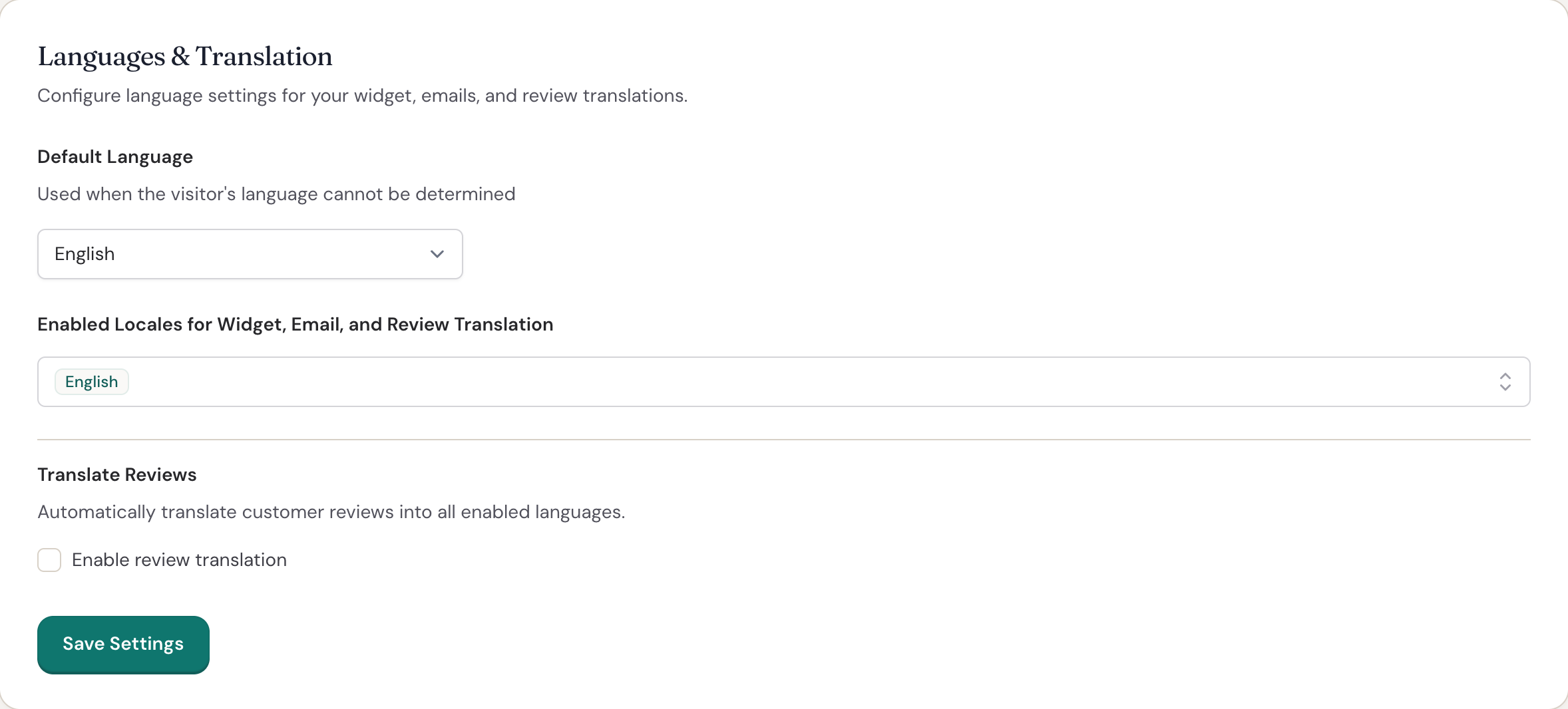
Reviewbird prepares translations after you save. You can continue using the dashboard while it works.
Translating the display widget
The widget follows the language of your WordPress store page. For example, a shopper viewing a French page sees the widget in French when you have enabled that language.
Reviewbird translates the text you set in Display Widget, including headings, buttons, and form labels. If you enable review translation, shoppers can also read translated customer reviews.
Translating Collect messages
Reviewbird translates the messages you save in Collect into your enabled languages. This includes product review requests, Google Business Review requests, Google Customer Reviews invitations, photo and video requests, and reminders.
Each message keeps its own wording. Edit the first request and each reminder separately in Collect. Reviewbird also translates your existing messages when you add a language.
Translating customer emails
Product review requests use the language saved with the customer's WooCommerce order. Their reminders use the same language. Google Business Review requests and Google Customer Reviews invitations also use the order language.
Emails about an existing review use the language of that review. These include photo and video requests, discounts, confirmations, reply notifications, publication notices, and edit links.
For example, a customer who writes a review in French receives the related emails in French when translations are available.
Translating review pages
The review form opened from a Collect email uses the same language as the email. Other customer pages, such as review confirmation and edit pages, use the review's language or your default language.
Translating showcases
Showcases can display translated text and reviews in your enabled languages.
Changing dashboard language
To change the language you see in Reviewbird, open your profile and update Dashboard Language. This changes your dashboard only. Your store's language settings still control what customers see.
Supported languages
English, Arabic, Czech, Danish, German, Spanish, Estonian, Finnish, French, Hindi, Italian, Japanese, Korean, Norwegian Bokmål, Dutch, Polish, Portuguese (Brazil), Portuguese (Portugal), Russian, Swedish, Thai, Turkish, Chinese (Simplified), and Chinese (Traditional).
Frequently asked questions
Why is some text still in the original language?
New translations take time to prepare. Until they are ready, Reviewbird uses the text you saved, or its default text if you have not customized it.
After you edit a Collect message, Reviewbird prepares a new translation. It does not send an old translation of the wording you replaced.
What happens when the customer's language is not enabled?
The widget uses your store's Default Language. Emails use an available translation or the saved message text. If WooCommerce did not save a language with the order, request emails use English.
Why can I not remove English or my default language?
Reviewbird keeps both selected in the enabled language list. You can add or remove the other languages on Plus and Everything.