

A showcase lets you add customer reviews to your home page, a landing page, or another store page. Choose the reviews and a layout, then add the showcase with a WordPress shortcode.
Starter includes three showcases. Plus and Everything include unlimited showcases. All three plans include every layout.
Create a showcase
- Open Showcases and select Create Showcase.
- Enter a Name to identify the showcase in your dashboard.
- Add a Title if you want a heading above the reviews.
- Choose a display mode and review source from the options below.
- Adjust the colors and display options. Check the live preview as you make changes.
- Select Active to let the showcase appear in your store.
- Select Create showcase.
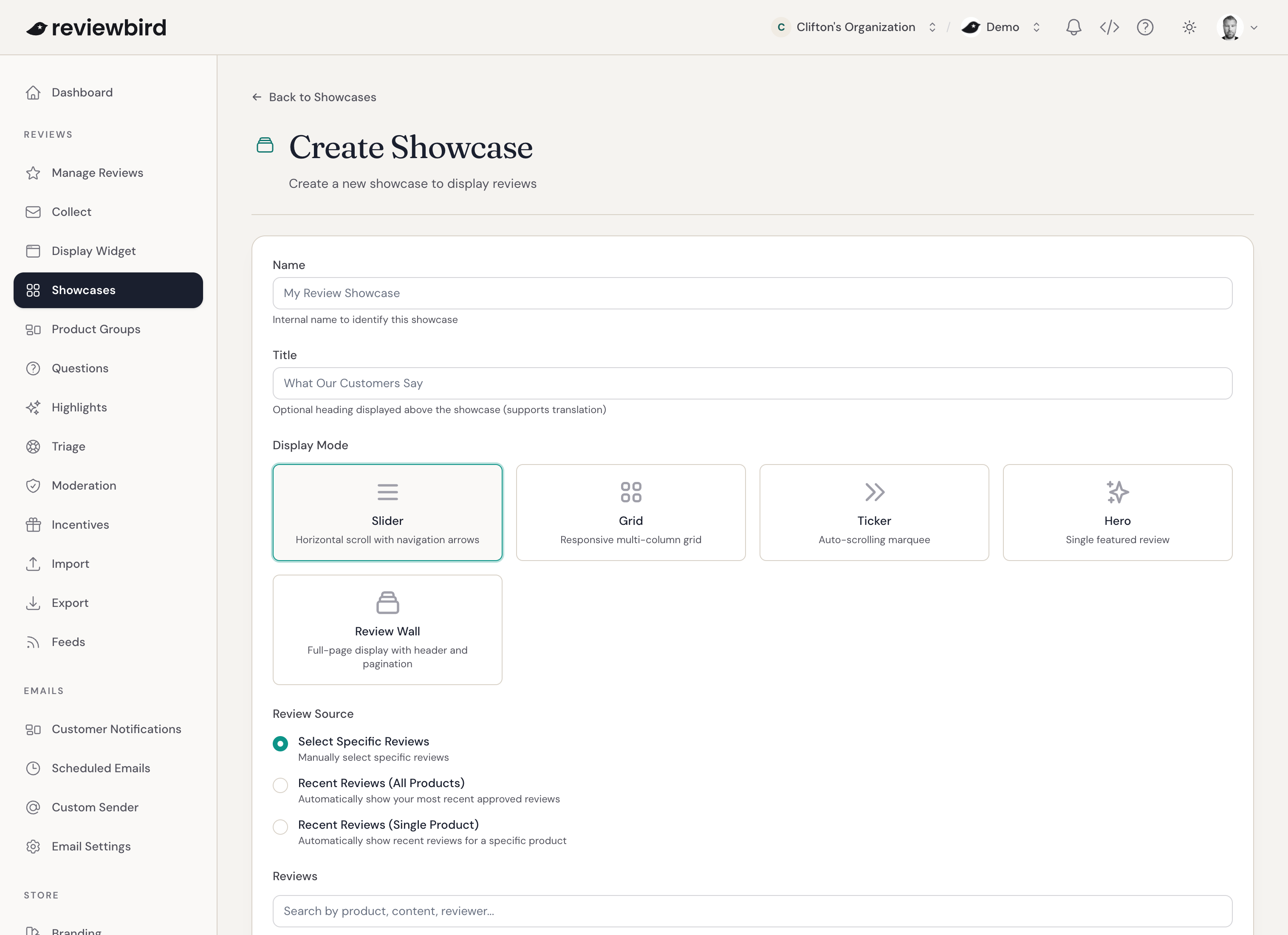
Select the review source
Select Specific Reviews
Choose the reviews yourself. Search by product, review text, or reviewer, then use the arrows to set their order.
Recent Reviews (All Products)
Show the latest reviews from across your store. Choose 1, 5, 10, 15, or 20 reviews and set a minimum star rating.
Recent Reviews (Single Product)
Show recent reviews for one product and its variations. Find the product by name or SKU, then choose the number of reviews and minimum star rating.
All Reviews
Show all published reviews with controls to move between pages. Use this source with the Review Wall layout.
Select a layout
- Slider shows a horizontal row of reviews with navigation controls.
- Grid arranges reviews in rows and columns that fit the screen.
- Ticker moves reviews across the page.
- Hero gives one review a large display area.
- Review Wall shows many reviews with a rating summary and page controls.
Change the display controls
Choose whether to show product names, reviewer names, dates, and photos or videos. You can also change the background, star color, card corners, and shadow.
Each layout has its own options. For example, you can set the Slider speed, Grid column count, or Ticker direction. Review Wall can show a rating summary, the number of reviews for each star rating, and 12, 24, or 36 reviews per page.
The Everything plan also lets you show AI review highlights.
The live preview shows how your choices look with selected reviews, recent reviews, or sample reviews.
Add a showcase to WooCommerce
- On the showcase edit page, copy the shortcode. It looks like this:
[reviewbird_showcase id="123"]. - In WordPress, open the page or post where you want to show the reviews.
- Add a Shortcode block and paste the shortcode into it.
- Save or publish the page.
Edit, deactivate, or delete a showcase
Open Showcases and select Edit beside the showcase you want to change.
To hide a showcase without losing its settings, clear Active. To remove it permanently, select Delete. You cannot undo a deletion.
Frequently asked questions
Why is my showcase empty?
Check that the showcase is active and that its selected reviews are published. A showcase does not show pending or hidden reviews.
Why can I not create another showcase?
Inactive showcases still count toward your plan limit. On Starter, delete an unused showcase to stay within the three-showcase limit, or upgrade to Plus for unlimited showcases.
Existing Free stores keep one showcase with the Slider layout.
Can a showcase include photos and videos?
Starter shows up to one photo per review. Plus and Everything support photos and videos. Existing Free stores show text reviews without photos or videos.
Can shoppers see more than 20 reviews?
Use Review Wall with the All Reviews source. Shoppers can move between pages to read more. The Recent Reviews sources show up to 20 reviews.
Does the minimum star rating apply to reviews I select myself?
No. The minimum star rating filters the automatic review sources. With Select Specific Reviews, you choose exactly which published reviews appear.